
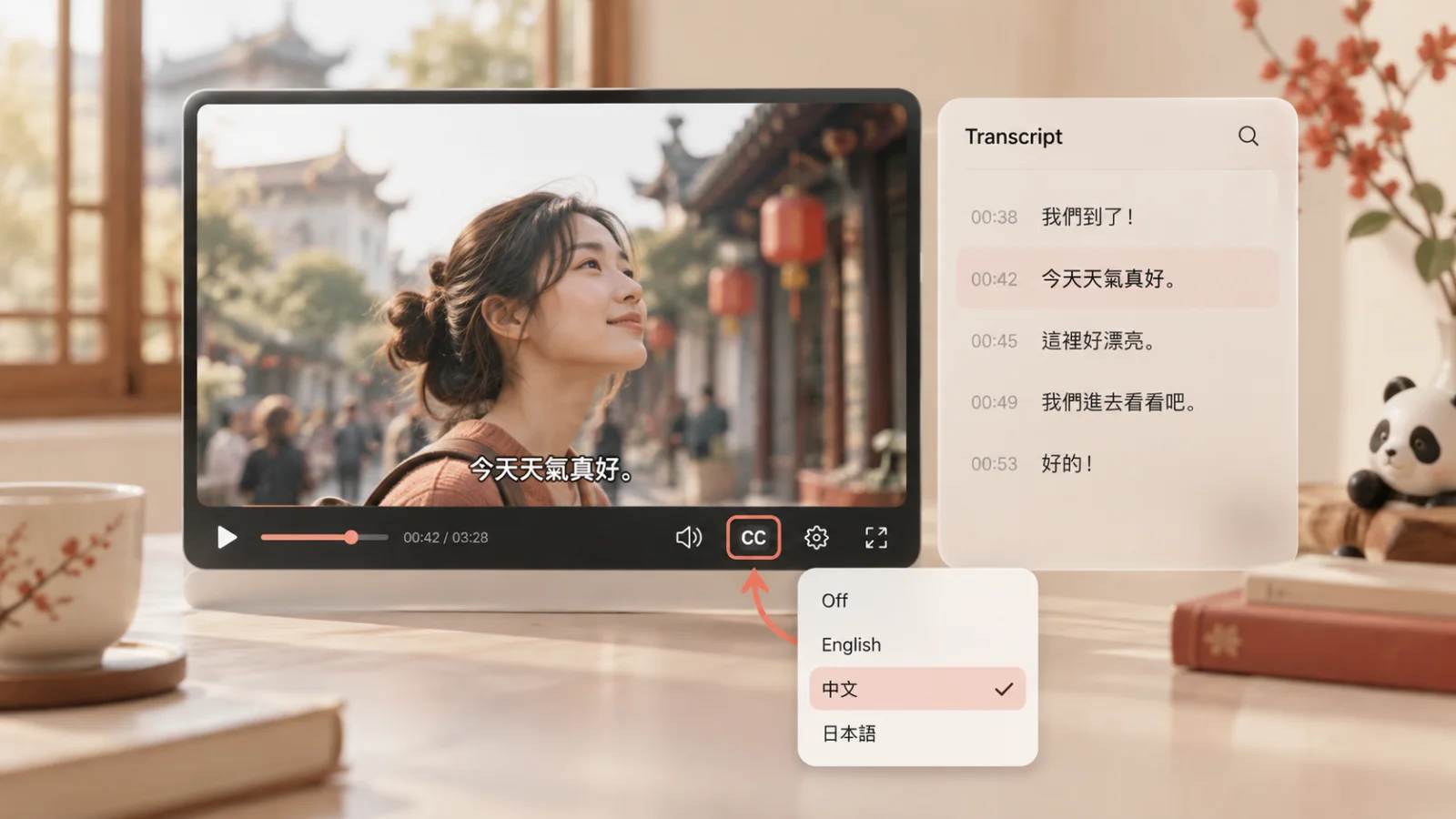
Before you collect vocabulary, check what kind of text you have. This guide walks through finding a track, opening the transcript, and deciding whether the video is worth a study session.
1. Find videos that have captions
Try a search such as “slow Mandarin with Chinese subtitles” or “Chinese daily routine with subtitles.” Add a topic you actually want to watch, such as cooking, pets, or ordering food.
On the desktop search-results page, open Filters and select Subtitles/CC. YouTube also uses a CC label in search results to indicate available captions. This filter checks for captions, not specifically Chinese captions, so inspect each video’s languages before choosing it.
A title containing “Chinese subtitles” is a lead, not a complete check. Open the video and look at what is available.
2. Check the subtitle language in the player
On a computer
- Move the pointer over the video to reveal the controls.
- Open the player’s Settings menu, then Subtitles/CC.
- Select a Chinese track if one is listed. Use CC to show or hide it.
If several Chinese options are available, choose the script you already study. Simplified and Traditional are writing systems; neither label tells you, by itself, which spoken variety you will hear.
On a phone or tablet
Tap the video to reveal its controls. Use CC to toggle captions and the player’s menu to find Captions and the available languages. Button placement can vary, so check the actual player on your device rather than looking for a desktop gear in exactly the same corner.
Notice how the Chinese text was produced
YouTube distinguishes speech-recognition captions from translations. They are not interchangeable for a listening exercise.
| What you find | What to check before studying |
|---|---|
| A Chinese track in the language list | Compare it with the speech. A language label alone is not a quality guarantee. |
| Chinese captions marked as auto-generated | Check unfamiliar phrases against the audio before saving them. |
| Chinese chosen through Auto-translate | Treat the result as translated text, not a verified transcript of the original Mandarin. |
Automatic captions use speech recognition. Accents, pronunciation, background noise, and other audio issues can cause mistakes.
Auto-translate does a different job: it translates caption text into another language. Suppose a Mandarin video only offers English subtitles. Translating those subtitles back into Chinese does not recover the speaker’s exact original wording. For phrase-by-phrase listening practice, look for Chinese text that actually follows the recording.
3. Open the Chinese transcript
On the video’s watch page, expand the description and look for Show transcript. YouTube’s transcript displays caption text, and selecting a line takes you to that point in the recording.
Check the language of the text that opens. If the panel offers language selection, choose the Chinese track. Do not assume that a panel full of English text is the Chinese transcript simply because you changed a setting elsewhere.
Pick a line, jump to it, and replay the sentence. That is enough to start checking vocabulary; there is no need to copy the whole transcript into a document.
If the transcript control is missing in your app or an embedded player, try the video’s full watch page in a desktop browser. This is a troubleshooting step, not a guarantee that a missing track will appear. You can also check the description for a transcript published by the creator.
4. Tell a subtitle track from writing inside the video
A switchable caption track is separate from the picture. Burned-in subtitles are part of that picture and remain visible when the viewer turns closed captions off.
Persistent text might also be a title, vocabulary label, or summary rather than a transcription of everything being said. Compare it with the speech instead of assuming every line is a subtitle.
The practical distinction matters when you want to select words or import a transcript. Writing inside the picture does not, by itself, supply a YouTube caption track. Extracting that writing is a different task from reading a subtitle file.
A video can still be useful without an importable track. You can pause and study its visible text manually. Just do not choose it expecting the CC button to turn that text into a selectable transcript.
5. Check whether the video is suitable for your lesson
Try this check on a short passage before committing to the whole video. The aim is to avoid spending your study time repairing subtitles or translating material far beyond your level.
Check the audio as well as the text
Listen to the opening. For this guide, choose Mandarin audio rather than assuming that Chinese writing means you have a Mandarin recording. If the audio is not what you expected, check Settings → Audio track, when that option exists, and select the original Mandarin track if it is available.
Compare one complete sentence
Choose a line containing some words you already know. Replay it and check whether the text follows the sentence, including negatives and numbers.
Remove 不, and the meaning changes:
You do not need to audit the entire video. But if you can already see that a familiar sentence has changed meaning, do not turn the doubtful text into a flashcard. Missing a word such as “not” can make automatic captions contradict the audio.
If you cannot judge a line yet, use a creator-supplied lesson transcript or ask someone to check that line. A confident-looking subtitle is not a reason to memorize a phrase you cannot make sense of.
Check timing and reading support
Try following a few lines while listening. If the text appears too early, too late, or in blocks you cannot connect to the speech, pick a shorter passage or another video.
Then check the support you personally need. Can you read enough of the characters to look up a phrase? Does the lesson provide pinyin or an explanation elsewhere? Choose a setup you can use now, rather than spending the session trying to remove every difficulty.
Decide whether to use it today
For a short beginner session, use a passage whose situation you can explain and whose main unknown phrases you can identify. If nearly every line needs a full translation, save it for later.
A three-minute clip is not automatically easy. Give yourself permission to study only one exchange, or to choose something simpler.
What to do when Chinese subtitles are missing
Start with the problem you can actually see. The actions below are alternatives to spending the session repeatedly changing settings.
| What you find | A practical next step |
|---|---|
| Only an English track | Check the creator’s description or lesson page for the original Chinese text. For exact listening practice, do not substitute a translation back into Chinese. |
| Chinese writing in the picture, but no separate Chinese track | Study it manually if that suits your goal, or choose another video when you need selectable text. |
| No transcript control in your current view | Check the expanded description on the full watch page in a desktop browser. If it is still unavailable, look for the creator’s transcript. |
| Automatic text you cannot confidently match to the speech | Choose a clearer passage or a lesson with text you can check. Leave doubtful phrases out of your vocabulary list. |
YouTube supports automatic Chinese captions, but that does not mean every upload will have them. Processing, poor audio, overlapping speakers, and other issues can prevent automatic captions from appearing. There is no reliable viewer-side fix that makes a missing Chinese transcript appear on every video.
For a study session today, choosing a different clip is a reasonable solution.
The video has captions, but a learning app cannot import them
Treat playback in YouTube and import into another tool as separate checks. Do not assume visible text guarantees import, and do not assume an import error proves that the video has no text.
First confirm which track is available in YouTube. Then test the actual video in your chosen learning tool. Even YouTube’s developer documentation treats listing caption tracks and retrieving their text as separate operations; a listed track is not the same thing as receiving the subtitle file.
Turn a usable transcript into a short study session
Once the audio and text are suitable, choose a short passage and check a few useful words before watching. Leave familiar words alone. Watch for the meaning of the exchange, then return to the transcript to check one detail you missed.
For a worked example, follow our 15-minute YouTube study routine. If you still need a starting video, use our short Chinese videos for beginners instead.
You can do this with a note on your phone. For a guided study flow, try Learn Then Watch after checking that your selected video works in the app.
The useful question is not simply “Does this video have subtitles?” It is “Can I use this text to check what I hear?” Answer that before building your vocabulary list.